If your best customers live on the streets around you — not across the country — Nextdoor deserves a serious look. It’s the neighborhood network where someone posts “who’s a good plumber around here?” and actual neighbors answer. A free Nextdoor Business Page puts your business inside those conversations, and neighbor endorsements called Faves can surface you in Nextdoor’s Local Faves discovery hub. This guide walks you through claiming your page, earning Faves the honest way, the rules for what businesses can post, and what’s genuinely new on Nextdoor in 2026 — every 2026 claim verified against Nextdoor’s own documentation.
Quick Answer
- Is a Nextdoor Business Page free? Yes. Claiming and maintaining a Business Page is free, including Faves, written recommendations, and organic posts. Paid options (Nextdoor Ads, Opportunity Alerts) are optional extras.
- Who should use it? Local businesses whose customers live nearby: home services, restaurants, neighborhood shops, salons, dental and medical practices — anywhere word-of-mouth drives decisions.
- What can it realistically help with? Being found when neighbors ask for recommendations, collecting Faves and written recommendations, and posting updates that followers see in their feed.
- What’s the first action? Search Nextdoor for your business and claim the page — Nextdoor automatically creates pages for local businesses, so yours may already exist.
Is Nextdoor Worth It for Your Business?
Nextdoor is not a universal must-have. It’s a strong fit when your customers are your neighbors. Use this quick framework:
Strong fits:
- Home services and contractors — plumbers, electricians, HVAC, landscapers, cleaners, handymen, painters, roofers.
- Restaurants, cafés, bakeries, and other neighborhood food spots.
- Neighborhood retail: hardware stores, gift shops, grocery, pet supply.
- Salons, barbershops, nail salons, spas.
- Dentists, orthodontists, and local clinics.
Weaker fits — be honest with yourself:
- Primarily e-commerce or national businesses whose customers aren’t local.
- Certain B2B models with no neighborhood demand.
- Owners who can’t maintain one more platform — a stale page with wrong hours is worse than no page.
- Businesses whose customers simply aren’t on the platform in their area.
The three-question test: Do neighbors in your area ask for what you sell? Does word-of-mouth drive your business? Can you keep basic info current? If you answered yes three times, claim the page. If not, the section “When Nextdoor Is NOT Worth Your Time” below will save you the trouble.
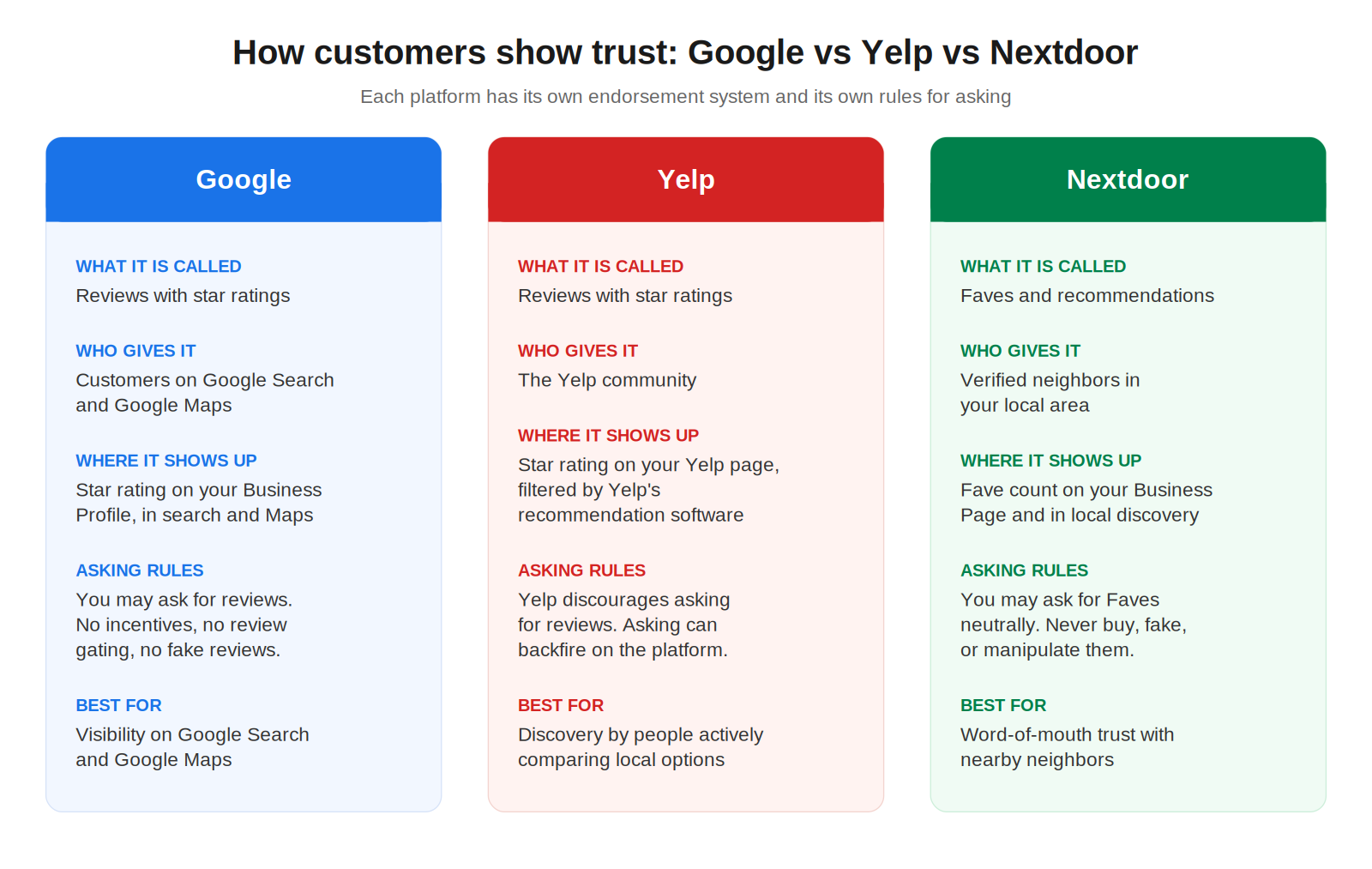
Nextdoor vs Google vs Yelp
These platforms do different jobs. Don’t pick one — understand each one’s role:
- Google = reviews + search visibility. People search with intent (“plumber near me”), and your Google Business Profile, review count, and ratings shape map rankings. See our guides on setting up your Google Business Profile, ranking higher on Google Maps, and getting more Google reviews.
- Yelp = reviews + discovery. Strong for dining and services, with powerful SEO — but a strict policy against asking for reviews. See our Yelp for small business guide.
- Nextdoor = neighbor recommendations + Faves. Conversational rather than search-driven: neighbors ask, neighbors answer. Businesses surface through Faves, written recommendations, and the Local Faves discovery hub.
Most local businesses benefit from Google plus one more channel. Nextdoor is that “one more” when your customers are your neighbors.
Claim or Create Your Nextdoor Business Page
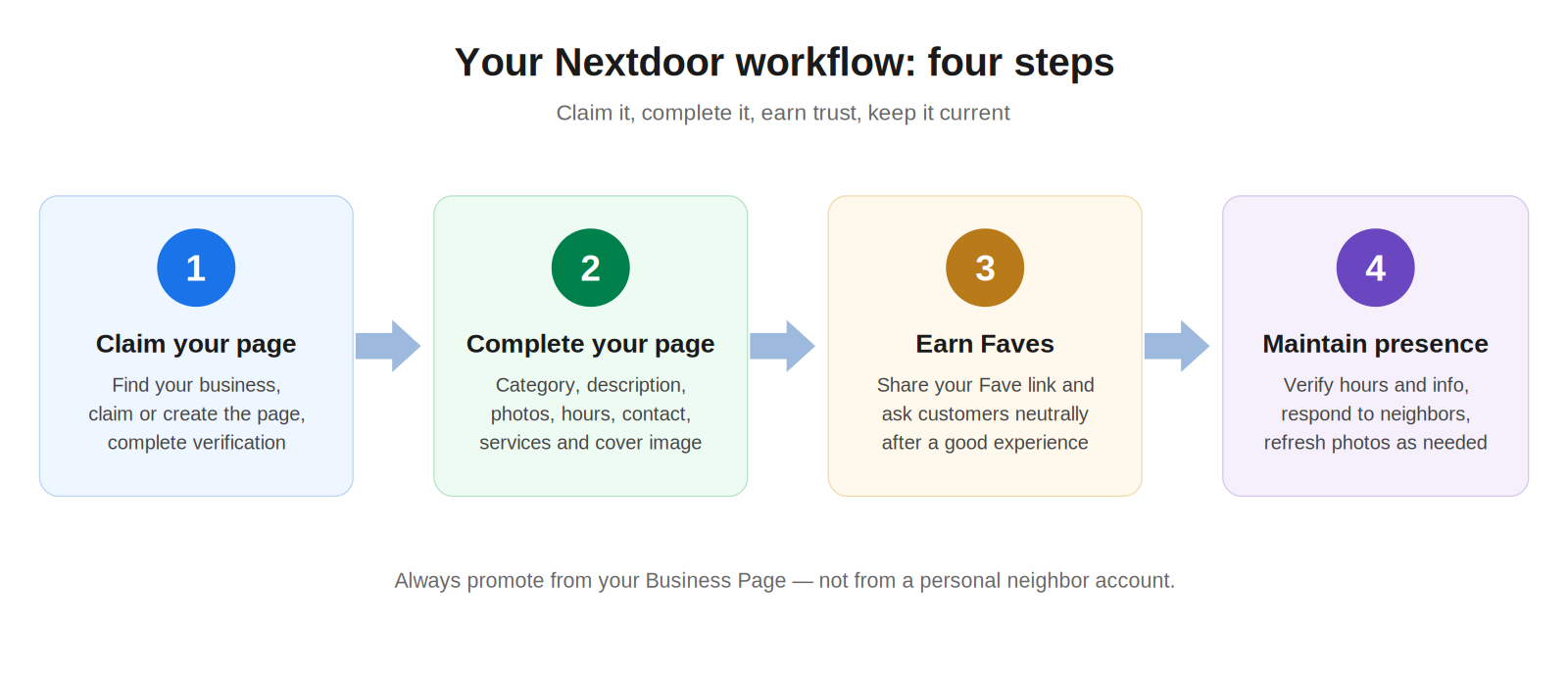
Nextdoor automatically creates business pages for local businesses listed in each neighborhood — so before you build anything, check whether your page already exists. The steps below follow Nextdoor’s current help documentation (How to claim your business page).
Step 1: Log in with your personal neighbor account
You’ll connect a separate business identity to your personal account, which lets you switch between them without logging out. Don’t link them if you share login details with employees.
Step 2: Search Nextdoor for your business
Use the main search. If a page for your business exists, open it.
Step 3: Claim the page
If the page is unclaimed, you’ll see a claim option near the top of the page. Follow the prompts and complete verification — verification confirms your connection to the business.
Step 4: If there’s no claim option, the page may already be claimed
Don’t create a duplicate. Track down whoever claimed it (a partner, former employee, or marketer) and request access from them.
Step 5: If no page exists, create one
Click your profile icon and choose “Add business page.” Enter your business details — Nextdoor checks for existing matches first so you don’t create a duplicate. If nothing matches, create the new page, then verify it.
Step 6: Logged out?
Visit Nextdoor’s claim page while logged out and you’ll be prompted to log in or create an account first.
Troubleshooting
- Incorrect info on an unclaimed page? Anyone can “Suggest an edit” — corrections to the name, address, phone, website, or operating status go through an automated review.
- Switching identities: once your business profile is connected to your personal account, you can switch between your neighbor identity and your business identity without logging out. Always post business content from the business identity.
Complete the Business Page
A claimed page with bare-bones info won’t win anyone’s trust. Work through this checklist — it covers only fields Nextdoor currently supports:
- Business name — exactly as customers know it.
- Category — pick the most accurate one (you can change it later).
- Address, phone number, and website — the basics neighbors check first.
- Hours of operation / operating status — keep these current; wrong hours erode trust fast.
- Description — plain language: what you do, who you serve, what makes you the local choice.
- Photos and cover photo — real photos of your work, storefront, or team. No stock-photo clichés.
- Call/message options — the redesigned pages feature a clean call/message bar, so make sure your contact details are correct.
One requirement to note: Nextdoor requires a business to verify its page before it can create posts. Verification is worth doing immediately, not later.
Recommendations and Faves: Nextdoor’s Terminology, Explained Precisely
Nextdoor uses specific words for specific things. Mixing them up is the most common mistake in older guides. Here’s the official breakdown, per Nextdoor’s help documentation:
What a Fave is
- A Fave is how a neighbor follows and endorses a business page. Clicking the Fave button under the business’s name means “I vouch for this business and want its updates in my feed.”
- The number next to the Fave icon is simply the count of neighbors who have Faved the page.
- A Fave is not a recommendation. Nextdoor is explicit: Faving means you’ve “followed” the page. When a neighbor clicks Fave, they’re prompted to also write a recommendation — but they can skip that step.
- Faving a business means its posts appear in that neighbor’s newsfeed.
What a recommendation is
- A recommendation is a written endorsement from a neighbor. There are two ways to leave one: on the business’s page (in the “What do you love about this business?” box) or by @mentioning the business page in a post or comment.
- Recommendations — both those written on the page and posts/comments where the business was tagged — appear under the page’s “What neighbors say” tab. Recommendations written right after Faving are also shared in the newsfeed.
- Recommendations are visible to anyone. Neighbors can edit or delete their own. Businesses can see and reply to recommendations on their page.
- Negative recommendations are possible. Nextdoor encourages members to recommend businesses they’d vouch for, but says sharing a genuinely bad experience can be valuable too — within the community guidelines (specifics, not name-calling).
What businesses can see — and can’t do
- You can see who Faved your page and a chart of Faves over time in your Dashboard’s Faves tile, and you’ll get notifications for new Faves.
- You cannot message neighbors — whether or not they’ve Faved your page. Don’t build your strategy around DMs you can’t send.
Bottom line for owners: Faves are the count, recommendations are the words, and both feed how prominently you appear in discovery (more on that in the Local Faves section). Sources: Business Page Faves, About business recommendations on Nextdoor.
How to Ask Customers for Faves
Unlike Yelp — which prohibits asking for reviews — Nextdoor’s mechanics assume neighbors endorse businesses they genuinely like. Asking is fine; manufacturing endorsements is not. Keep every request neutral and honest:
- After the service: “If you were happy with the work, a Fave on our Nextdoor page helps neighbors find us — it takes about a minute.”
- Receipt or thank-you message: add one line with your page link: “Enjoyed working with us? Fave us on Nextdoor.”
- Email follow-up: a short post-service email with a direct link to your Business Page.
- SMS: only where the customer has consented to texts.
- QR code on printed material: invoices, door hangers, business cards, or a counter sign linking straight to your page.
- Social profiles: a line in your bio pointing neighbors to your Nextdoor page.
Never do these: fake endorsements, purchased Faves, asking employees to pose as customers, or pressuring anyone. Nextdoor is built around verified neighbors — and the FTC has rules targeting fake and purchased reviews. For the parallel playbook on Google, see our guide to getting more Google reviews; the timing and tone transfer, even though the ask is different.
Local Faves: The September 2026 Discovery Experience
On September 2, 2026, Nextdoor announced Local Faves: a dedicated discovery hub where neighbors browse, filter, and save local businesses that other neighbors recommend. On the web, it’s the “Local Faves” item in the left navigation at nextdoor.com; it’s available in the U.S., Canada, and the United Kingdom.
- How businesses appear: businesses are organized by category, and the more a business is Faved, recommended, or mentioned by neighbors, the more likely it is to appear in the hub.
- Relationship with Faves: every Fave contributes to your overall Fave count, which influences how prominently you appear in Local Faves and other community surfaces.
- No fixed placement: rankings shift over time as neighbor activity changes — this is a living ranking, not a directory listing you buy once.
- Filters: neighbors can narrow by category chips (e.g., Food & Drink → Restaurants, Coffee & Cafés, Bakeries) and by distance with a radius slider.
- Saving: neighbors can save businesses to a “My Faves” list for later.
Why this matters for owners: Local Faves turns the Faves and recommendations you’ve earned into ongoing discovery. It’s the payoff for the work in the previous two sections. Source: Browse and fave local businesses with Local Faves and Nextdoor’s September 2, 2026 announcement.
2026 Fave Awards
Evergreen: Nextdoor runs an annual Fave Awards program in which neighbors vote for the local businesses they love most. The businesses with the most votes in each category in each neighborhood are named winners. Winners are notified by email or SMS and receive a digital promotion kit — including a Fave Awards badge for their website — plus a physical sticker. Paid advertising has no impact on voting or winners, and a business doesn’t need to do anything special to be eligible beyond having a page neighbors can vote for.
The 2026 event: per Nextdoor’s official rules, voting ran from September 4 through September 30, 2026 (Pacific Time), with winners announced on or about early October 2026. Note that Nextdoor described a phased rollout, so some neighbors may have seen the voting page slightly earlier or later. The 2026 program covers up to 20 categories — including home services (plumbers, electricians, house cleaners, handymen, lawn services, general contractors), food & dining, shopping, personal care, and pet care. The public winners page at nextdoor.com/favorites shows the 2025 winners until the 2026 winners are announced.
Sources: Nextdoor Fave Awards 2026, 2026 Official Rules.
What Changed on Nextdoor in 2026
Nextdoor shipped an unusual amount of business-facing change in 2026. Here’s what’s available now versus what’s announced as coming soon — per Nextdoor’s September 2, 2026 announcement.
Available now:
- Local Faves discovery hub (U.S., Canada, United Kingdom) — the category-based, trust-ranked hub described above.
- Redesigned free Business Pages (U.S., Canada, United Kingdom) — AI-generated summaries, cover photos, a “What neighbors say” tab, elevated Fave Awards display, and a clean call/message bar.
- Easier-to-browse pages — contact info, Faves, recommendations, business posts, and Fave Awards recognition in one place.
- Improved AI-powered search (U.S.) — AI summaries distill years of neighbor conversations; businesses mentioned in posts are automatically tagged and linked to their pages.
- Opportunity Alerts (U.S., paid) — routes requests from verified neighbors directly to local service providers (auto repair, gardening, handyman, moving, and similar).
- Self-promotion policy change (see next section) — business promotion must now come from a Business Page, not a personal account.
Coming soon (announced, explicitly labeled “coming soon” by Nextdoor):
- New business onboarding (U.S.) — a guided educational experience for business owners.
- Improved dashboard (U.S.) — easier performance tracking and campaign management in one place.
- Feed for local businesses (U.S.) — the ability for businesses to comment and engage directly in the neighborhood feed.
Treat the “coming soon” items as roadmap, not reality, when planning your time.
What Can Businesses Post? The Current Rules
In August 2026, Nextdoor tightened its self-promotion rules. The current policy is unambiguous — quoting Nextdoor’s help center: “Nextdoor no longer allows self-promotional posts to be made from a personal (neighbor) account. They must be made from a business page instead.” Here’s what that means in practice:
Allowed — from your Business Page (once verified):
- Posts and updates to the neighborhood newsfeed.
- Responding to recommendations and @mentions of your business.
- Replying to comments and DMs related to your business — from the business identity.
Not allowed — from your personal neighbor account:
- Self-promotional posts in the main feed or For Sale & Free advertising your services, events, or offers.
- Replying to a neighbor’s recommendation request to recommend your own business — that reply must come from your business profile or from other neighbors.
- Unsolicited promotional DMs (e.g., messaging everyone who asks for a plumber).
- Having family, staff, or close friends post about your business from their personal accounts — Nextdoor treats this as business promotion too, whether or not the relationship is disclosed.
Enforcement: promotional content from personal accounts may be automatically suppressed or blocked; reported content can be removed; repeat violations can restrict account access.
Exceptions: genuinely casual neighbor-to-neighbor activity is still permitted from a personal account — occasional small-scale tasks (a teen’s lawn mowing, homemade baked goods) posted at most once every 30 days under your own name, with no business registration, website, or price list. One-time happenings like garage sales and community events are fine, as are nonprofit/community fundraisers (about once a week). If the activity starts looking like an ongoing business, Nextdoor expects a Business Page.
What never changed: organic recommendations by actual, unaffiliated neighbors are welcomed and encouraged. The policy targets ongoing commercial promoters, not neighbors sharing businesses they genuinely love.
Source: Self-Promotion using your Personal Account.
Free vs Paid on Nextdoor
| FREE | OPTIONAL PAID PRODUCTS |
|---|---|
| Claiming and maintaining a Business Page | Nextdoor Ads — promote to neighbors in the areas you serve, with budget and targeting controls |
| Organic page functionality: posts, Faves, recommendations | Opportunity Alerts (U.S.) — a paid subscription that sends real-time alerts when verified neighbors post service requests; respond via DM or comment from your Business account. Pricing varies by service category and area |
| Earning Faves and recommendations from neighbors | |
| Appearing in Local Faves and the annual Fave Awards on merit |
Two things worth knowing: you must verify your page before you can create posts, and no purchase of any kind affects Fave Awards voting or winners.
Handling Complaints and Negative Neighbor Feedback
Nextdoor’s feedback is conversational, not star-rated. Complaints show up as recommendations, comments, or posts — and neighbors can see how you respond. A few practical rules:
- Respond from your Business Page, not your personal account.
- Stay factual and specific. Acknowledge what happened, explain what you’ll do, and take heated situations to a phone call or DM where appropriate.
- Don’t argue in the thread. An audience of neighbors is watching; the goal is to look reasonable, not to win.
- Never fake positivity — planted endorsements violate Nextdoor’s policies and run into FTC rules on fake reviews.
This differs from Google reviews, where star ratings are public, searchable, and SEO-visible. For that playbook, see our guide to responding to negative Google reviews.
Monthly Maintenance Checklist
Nextdoor doesn’t demand constant attention — it demands accurate basics. Once a month:
- Verify hours, phone number, address, and website are still correct.
- Refresh photos when something meaningful changes (new work, new storefront, new team).
- Check new Faves and recommendations; reply to recommendations where a response adds value.
- Skim for platform changes — Nextdoor has been shipping quickly through 2026.
- Ask the honest question: is Nextdoor producing useful customer activity? If not after a fair trial, deprioritize it rather than feeding a dead channel.
When Nextdoor Is NOT Worth Your Time
A required dose of honesty:
- No meaningful neighborhood demand. If your customers aren’t local, a neighborhood network can’t help you.
- Primarily national or e-commerce. Nextdoor’s unit of value is the neighborhood; it has nothing to offer a Shopify store shipping nationwide.
- Certain B2B models. If your buyers are procurement departments, not neighbors, skip it.
- You can’t maintain another platform. An unclaimed or outdated page — wrong hours, dead phone number — actively hurts. Either maintain it or don’t start.
- Your customers aren’t on the platform. Adoption varies by area and demographic. If your actual customers don’t use Nextdoor, your effort goes nowhere.
Don’t overstate the ROI: Nextdoor is a word-of-mouth amplifier for neighborhood businesses. It is not a lead machine for every business, and the free page is only “free” if your time is worthless — spend it where your customers are.
Frequently Asked Questions
Is Nextdoor free for businesses?
Yes. Claiming and maintaining a Business Page is free, including Faves, written recommendations, and organic posts. Nextdoor Ads and Opportunity Alerts are optional paid products.
How do I claim my business on Nextdoor?
Log in to Nextdoor, search for your business, and use the claim option on the page if it exists — Nextdoor automatically creates pages for local businesses. If no page exists, create one from your profile icon via ‘Add business page,’ then verify your connection to the business.
Can a business post on Nextdoor?
Yes — from its Business Page, once the page is verified. Posting updates to the neighborhood newsfeed and responding to recommendations and mentions are core Business Page functions.
Can I promote my business from my personal Nextdoor account?
No. Under Nextdoor’s current self-promotion policy, promotional posts, comments recommending your own business, and unsolicited promotional DMs must come from your Business Page, not your personal neighbor account. Personal-account promotion can be suppressed, blocked, or removed.
What is a Nextdoor Fave?
A Fave is how a neighbor follows and endorses a business page. The number next to the Fave icon shows how many neighbors have Faved the page. A Fave is not itself a recommendation — though clicking Fave prompts the neighbor to write one, which they can skip.
How do I get Faves on Nextdoor?
Ask happy customers neutrally after a completed service — in person, on receipts, by email, by SMS (with consent), or via a QR code linking to your page. Keep a complete, verified page. Never buy Faves, plant fake endorsements, or have employees pose as customers.
What if my business page is already claimed?
Don’t create a duplicate. Track down whoever claimed it — a partner, former employee, or marketer — and request access from them.
Is Nextdoor worth it for a small business?
If your customers live nearby and word-of-mouth drives your business, usually yes — at minimum as a free, claimed listing in a recommendation-driven network. It’s a weaker fit for national, e-commerce, or B2B businesses and for owners who can’t maintain another profile.
Sources
- Nextdoor Help Center: Claim or create your business page
- Nextdoor Help Center: Business Page Faves
- Nextdoor Help Center: About business recommendations on Nextdoor
- Nextdoor Help Center: Self-Promotion using your Personal Account
- Nextdoor Help Center: Browse and fave local businesses with Local Faves
- Nextdoor Help Center: Nextdoor Fave Awards 2026
- Nextdoor Help Center: 2026 Nextdoor Fave Awards Official Rules
- Nextdoor announcement, September 2, 2026: “Nextdoor Deepens Its Commitment to Local Business Discovery and Recommendations”
- Nextdoor Fave Awards winners page
2 thoughts on “Nextdoor for Business: Claim Your Page and Win Local Recommendations”
Comments are closed.